Side projects / 02
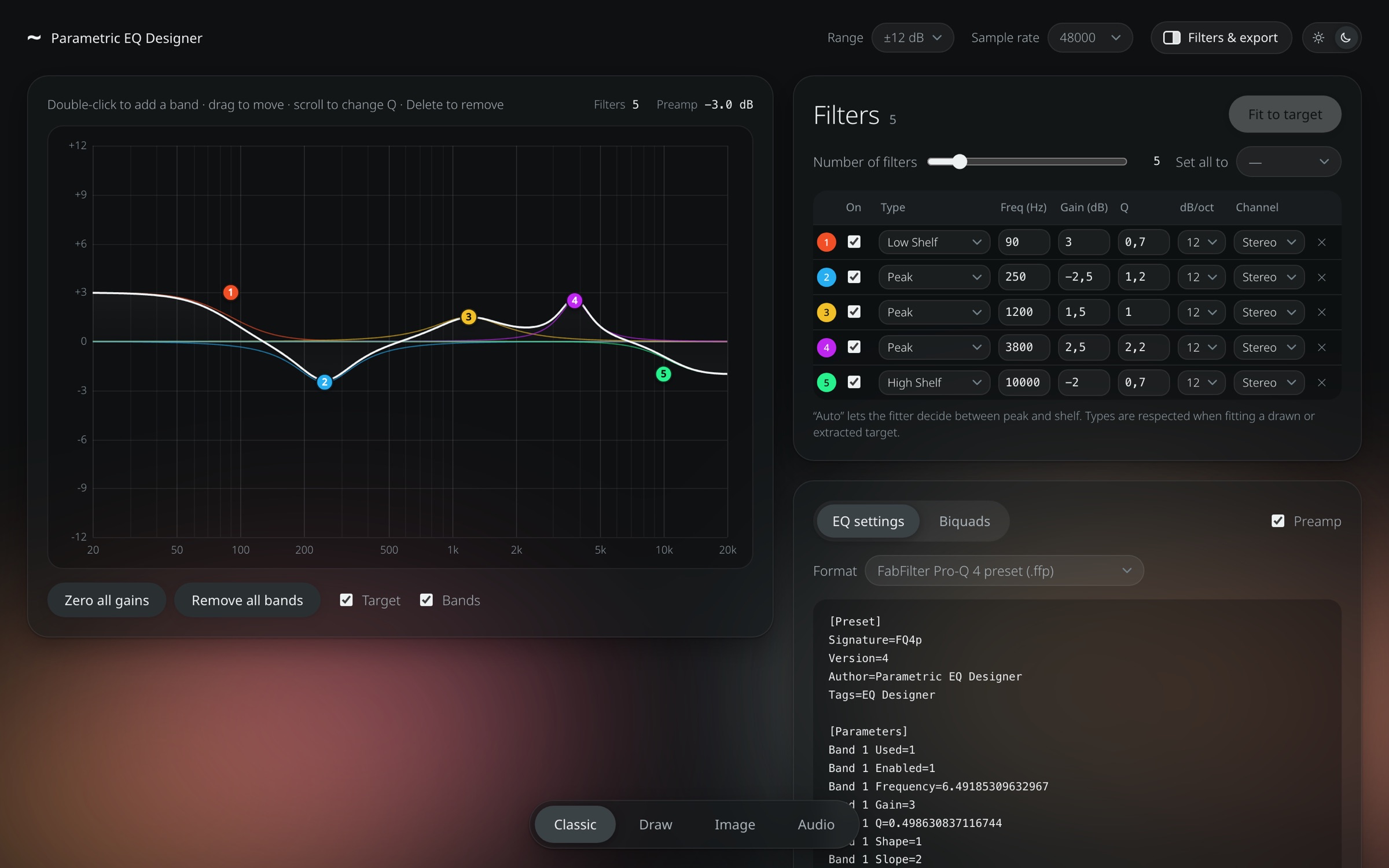
Parametric EQ Designer: one place to shape, match and export EQ curves
- Context
- Personal side project
- Type
- Web tool, runs in the browser
- Role
- Concept, design & build, with AI
- Exports
- FabFilter Pro-Q, Equalizer APO, DSP biquads
# The problem
Designing an EQ curve was the easy part. Getting it to where it was needed was not.
I had two very different jobs. One was room correction for my listening setup: measured with SoundID Reference, but the result had to end up in a separate DSP. The other was matching EQs to compensate the head resonance of a dubplate cutting machine, tuned by ear in FabFilter Pro-Q, where the low end also has to stay mono for the groove to cut cleanly. Each tool spoke its own format, and nothing moved cleanly between them.
- Room correction curves had to be rebuilt by hand, filter by filter, in the DSP
- Matching EQs lived inside Pro-Q presets and couldn’t be reused anywhere else
- Stereo material needed different treatment for the middle and the sides, which simple matching tools ignore
- Every move meant re-typing values, reading curves off screenshots and hoping the result still matched
# The idea
One place where any curve, however it starts, becomes a small set of clean parametric filters, and leaves in whatever format the next device or plugin needs. Four ways in, one fitter in the middle, many ways out.
01Classic
Place and drag bands directly on the curve, like any parametric EQ.
02Draw
Sketch the target shape with the mouse; the tool fits filters to it.
03Image
Drop a screenshot or photo of a curve, calibrate the axes, extract and fit.
04Audio
Match a track to a reference, or measure a before and after recording, in stereo, mid/side or left/right.
# What it does
Shape
- A fitter that turns any target into a small set of parametric filters (up to 24 per curve), choosing between peak and shelf where you let it (“Auto”)
- Slopes from 12 to 96 dB/oct on every shape, from cuts and shelves to notches and bells
- Every band can work on stereo, left, right, mid or side, drawn as its own curve on the graph
Match
- Match a track to a reference, or measure the real difference between a before and after recording
- Match on stereo, mid/side or left/right, with one set of filters per channel; the tool suggests mid/side when the middle and the sides clearly differ
- The side channel is treated gently (more smoothing, limited boost, nothing below 120 Hz), and the low end can be kept mono for vinyl
Listen
- An A/B player for original, with EQ and reference, synced and loudness-matched
- A listen switch to solo the mid, side, left or right channel while comparing
- A processed 24-bit WAV to download, rendered with exactly the exported filters
Export
- Pro-Q 4 and Pro-Q 3 presets in and out, so existing FabFilter curves can be reused or edited
- Equalizer APO / AutoEQ (with per-channel blocks), GraphicEQ, CSV, JSON and a plain table
- Biquad coefficients for DSPs at any sample rate, grouped by channel: normalised, miniDSP style, C array or SciPy SOS, with optional preamp
Everything runs locally in the browser; audio and images are never uploaded.
# How it was built
A coded prototype built with AI, the same way I design with AI: start from the real problem, get something working quickly, then test it against real files and real numbers. It grew feature by feature from actual sessions, from simple fitting to mid/side matching for vinyl.
Real formats
The Pro-Q preset formats were worked out from my own presets; Pro-Q 3 files read and write back byte for byte.
Measured accuracy
Tested with synthetic signals: before/after matching within 0.03 dB on each channel, reference matching within 0.1–0.4 dB, and the rendered WAV within 0.03 dB of the designed curve.
Designed to be used
Light and dark themes, collapsible panels, clear steps and honest feedback when a file can’t do what’s asked, like mid/side on a mono file.
# Try it
The tool runs fully in your browser. Try drawing a curve in Draw mode and press “Fit to target”, or drop in an EQ screenshot. Nothing you load leaves your computer.
You can also download it: a single HTML file with everything included, which you open in any browser on your own computer.