Side projects / 01
Buzzer Sound Lab: designing alert sounds for a tiny buzzer
- Context
- go-e · side project
- Status
- Exploration, not a shipped feature
- Role
- Concept, design & coded prototype, with AI
- For
- Hardware, firmware, design & product
# The brief
How should a charger sound when something needs attention?
A small buzzer on the board could tell people what is happening without opening an app. The simplest way to drive one is ringtone-style melodies (RTTTL): one note at a time, always the same square-wave tone. The brief was to explore richer, more recognisable alert sounds that a buzzer like this could realistically play, starting with alerts by urgency and leaving branded sounds for later.
- Make urgent alerts clearly different from confirmations and notifications
- Stay within what a small buzzer and the charger’s electronics can realistically do
- Give everyone involved one shared place to hear and decide, instead of describing sounds in words
# Bridging hardware, firmware & experience
Sounds sit right where three disciplines meet, and each of them sees a different part of the problem. The lab puts them in the same room:
Hardware
What the buzzer can physically produce: its resonance, loudness and the limits of the circuit driving it.
Firmware
How a sound is generated and stored: a simple tone driver, or a richer audio mode that costs more effort.
Experience
What people actually hear and understand: is it urgent, is it calm, can it be told apart from the others?
# The use case
Sounds are hard to discuss on paper. With the lab, a designer sketches an alert, product compares it with a basic version, and firmware sees right away what it would take to run it.
Compose
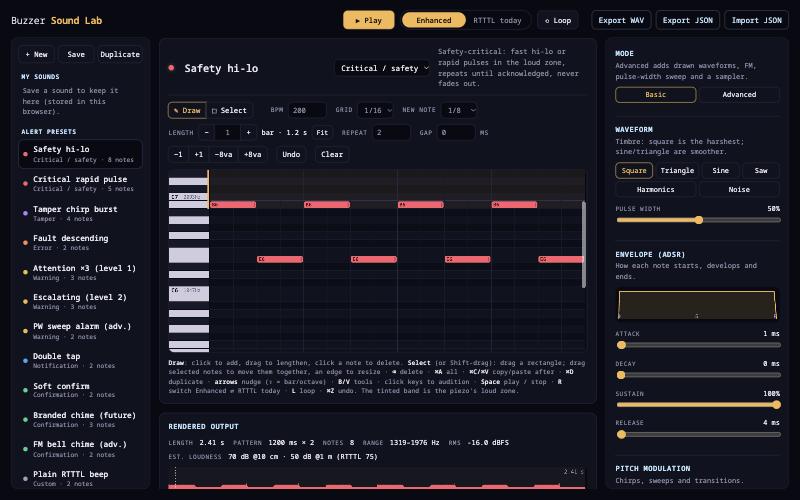
Start from a preset per category (critical, tamper, error, warning, notification, confirmation) or draw notes on a piano roll.
Compare
Switch between the enhanced sound and a basic RTTTL version with one key, to hear exactly what the extra effort buys.
Hand over
Export a WAV to share, a JSON to keep, and an RTTTL string for a simple firmware player.
# What it does
- Piano roll with tempo, grid, repeat and gap, plus keyboard shortcuts for fast editing
- Synth controls: waveform and pulse width, envelope (attack, decay, sustain, release), pitch sweeps, glide and vibrato, up to three voices
- An advanced mode with drawn waveforms, FM, pulse-width sweeps and a sampler
- A simulation of how a small electromagnetic buzzer resonates, so sounds are heard close to the real component rather than a laptop speaker
- A feasibility check that sorts each idea into “a simple tone driver can play it”, “needs a richer audio mode” and “not possible”, with an estimated loudness
- “My sounds”, saved in the browser, and export / import to share them
# How it was built
A coded prototype built with AI in a couple of days, the same way I design with AI: first the composer and the sound engine, then a hardware profile based on a candidate buzzer, so every idea is judged against a real component and not a generic speaker.
Why a working tool
Listening beats describing. A playable prototype let the team react to real sounds within days, instead of reviewing a spec.
What it enables
A common language between hardware, firmware and experience, so decisions on alert sounds rest on what people hear and what the hardware can realistically play.
# Try it
The full lab runs in your browser. Use headphones or speakers, press Play, and switch between “Enhanced” and the basic version (“RTTTL today” in the lab) to hear the difference. Sounds you save stay in your browser only.
You can also download the lab: a single HTML file you open in any browser on your own computer, with saving included.